Job Biodata Builder
Biodata maker for job applications
Some government offices, schools, and local firms in India still ask for a job biodata. Use this online biodata maker to build and preview every line free.
What CVEmber's job biodata builder includes — and leaves out
Clicking Build opens CVEmber directly on our Sprout template (which includes a dedicated Personal Details section for job biodatas — never marriage biodatas). Switch off personal fields anytime to export a standard private-sector resume from the exact same data.
| Field or setting | How the builder handles it |
|---|---|
| Name, contact & photo | Full name, phone, email, city/address, and a one-click passport-style Profile pic toggle. |
| Personal details block | Date of birth, languages known, and hobbies — formatted cleanly under Sprout's Personal Details section. |
| Education with marks | Degrees, board/university, graduation year, and percentage or CGPA in clean reverse order. |
| Work experience & skills | Previous roles with Month–Year dates, duties, and practical technical or office skills. |
| Standard declaration | Built-in declaration line with place, date, and your printed name where the signature goes. |
| Deliberately excluded | No fields for father's name, religion, caste, marital status, Aadhaar, or PAN — government forms that require those provide their own boxes. |
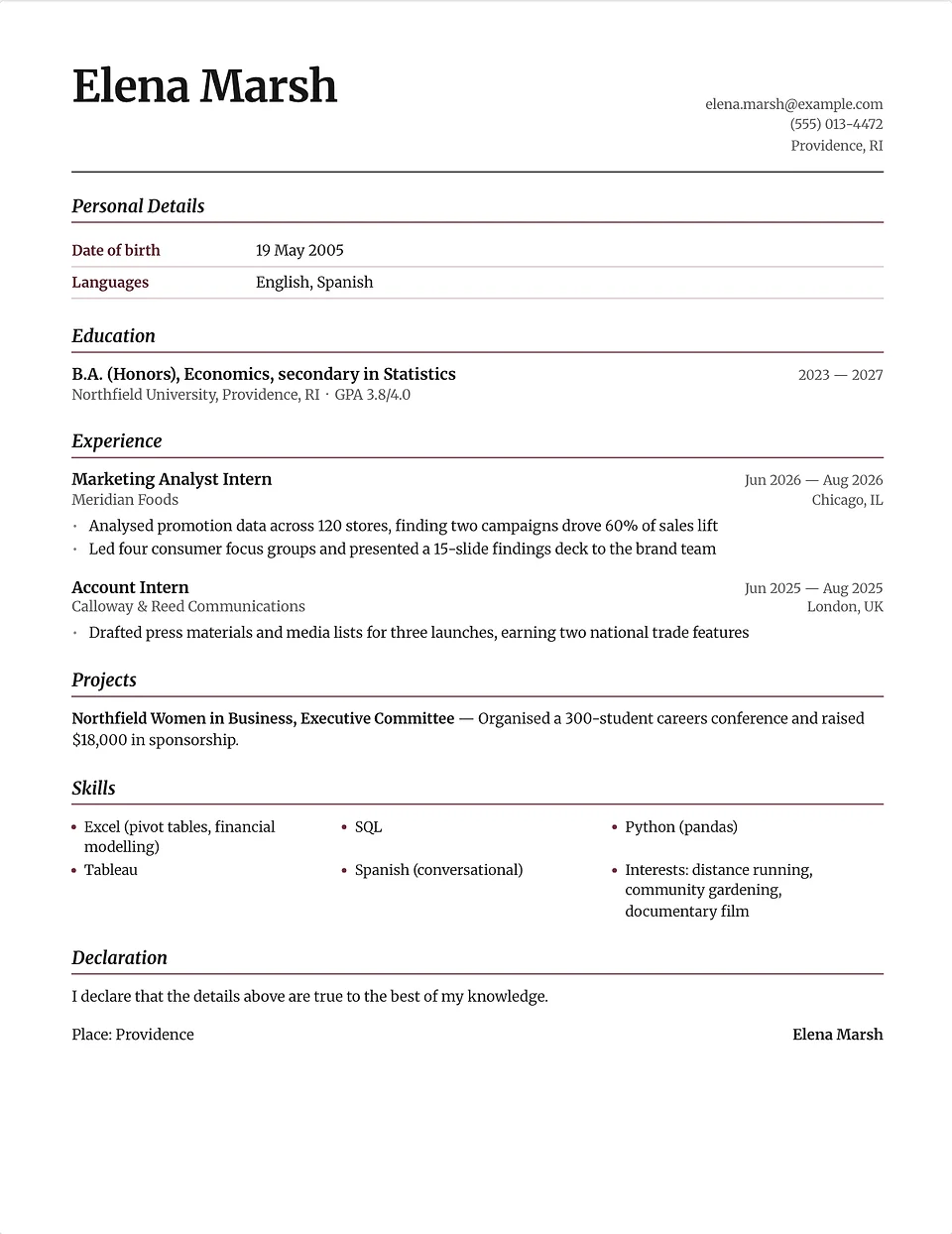
How to make a job biodata online in 5 steps
Start from a blank form or upload an existing PDF/Word resume so you never retype your degrees or job dates.
- 01Open the Sprout layout. Click Build my biodata free above to open CVEmber directly on Sprout (with its Personal Details section enabled). Upload an old resume or biodata (PDF or Word) to pre-fill your details, or start blank.
- 02Add your personal details and optional headshot. Enter your date of birth, languages you read/write/speak, and hobbies. Switch on the Profile pic toggle if the office expects a recent passport-size photo.
- 03Fill in Education with marks and Work Experience. List degrees and board exams with exact percentages or CGPA matching your marksheets, followed by any jobs or internships most recent first.
- 04Turn on the Declaration line. Add your city (Place), current date, and full name in the Declaration block at the bottom of the page.
- 05Preview in full free — pay once only to download. Check every line on screen with zero watermark before paying once to download matching PDF and Word (.docx) files.
Sample job biodata you can copy or recreate
A crisp one-page school-teaching job biodata using only the exact practical fields supported in Sprout.
Job biodata sample — Primary School Teacher (Ananya Deshmukh)
ANANYA DESHMUKH
Application for Primary Teacher (Mathematics & Science)
Nagpur, Maharashtra +91 97xxx xxxxx ananya.deshmukh@example.com
PERSONAL DETAILS
Date of Birth: 09/08/1999
Languages Known: Marathi, Hindi, English
Hobbies: Science quiz coaching, Classical music
EDUCATION
B.Ed (Mathematics & Science)
Rashtrasant Tukadoji Maharaj Nagpur University · 2023 · 76%
B.Sc (Physics, Chemistry, Mathematics)
RTMNU, Nagpur · 2021 · 72%
Class XII (Science)
Maharashtra State Board · 2018 · 78%
Class X
Maharashtra State Board · 2016 · 84%
CTET Paper I & Paper II
Qualified · 2023
WORK EXPERIENCE
Primary Teacher (Classes III–V)
Vidya Bharti Public School, Nagpur
June 2023 – Present
- Teach Mathematics and Environmental Studies across 3 sections (110 students) following CBSE activity guidelines.
- Prepare weekly worksheets, parent-teacher progress summaries, and annual science exhibition models.
- Available for a demonstration class on request.
SKILLS
- CBSE Lesson Planning
- Smartboard & Google Classroom
- Student Assessment
- Activity-Based Math Teaching
DECLARATION
I hereby declare that the above information is true and correct to the best of my knowledge and belief.
Place: Nagpur · Date: 27/11/2026 · Ananya Deshmukh
Applying to a private corporate company, startup, or MNC instead? Most private recruiters prefer a standard resume without personal details — see our India resume format guide or full biodata format guide.
Biodata maker questions
Is this job biodata maker free to use?
Building, editing, and previewing your entire biodata in full are completely free with no watermark. You pay once — starting from $14.99 — only when you download the PDF and Word (.docx) files, with zero auto-renewal.
What exact fields does the biodata builder support?
Name, contact details, optional passport photo, date of birth, languages known, hobbies, education with marks/CGPA, work experience, skills, certifications, and a declaration with place, date, and your printed name.
Can I add father's name, religion, caste, or marital status?
No. CVEmber deliberately omits fields for father's name, religion, caste, marital status, Aadhaar, and PAN. Government notifications that require those details provide their own official application form boxes.
Is this tool for a marriage biodata?
No. This builder is strictly for job biodatas requested by some government offices, schools, local companies, and traditional employers.
Should I send a biodata or a resume?
Match what the employer asks for. Most private companies, IT firms, and online job portals expect a resume; send a biodata only when a government office, school, or traditional employer explicitly asks for one.
Open the Sprout job biodata layout free
Start directly on CVEmber's Sprout layout (with Personal Details and Declaration), preview the whole page free with zero watermark, and pay once ($14.99 for one document) only when you download PDF and Word (.docx).
Free to build and preview · Pay once only on download · Never auto-renews.